- AI for Ecommerce and Amazon Sellers
- Posts
- Guide: Powering Up Your Customer Service with Voice AI
Guide: Powering Up Your Customer Service with Voice AI
A full guide inside

Jo Lambadjieva
March 24, 2026
Sponsored by


From Our Sponsor:
How Jennifer Aniston’s LolaVie brand grew sales 40% with CTV ads

The DTC beauty category is crowded. To break through, Jennifer Aniston’s brand LolaVie, worked with Roku Ads Manager to easily set up, test, and optimize CTV ad creatives. The campaign helped drive a big lift in sales and customer growth, helping LolaVie break through in the crowded beauty category.
Guide: Powering Up Your Customer Service with Voice AI
Most ecommerce founders start out answering every customer message personally. The replies are warm, specific, and sound like a real person wrote them — because one did. Then the business scales. You hire support staff or outsource to a VA, hand them a few templates, and suddenly your customer communication reads like it was written by a different company entirely.
The problem isn't laziness or bad hires. It's that typing forces everyone into the same flat, corporate-safe tone. Templates strip out personality. And the sheer volume of tickets means speed wins over voice every time.
Wispr Flow is a voice-to-text tool that works inside any app — your helpdesk, email, Slack, Amazon Seller Central — and turns natural speech into clean, formatted text. Instead of typing a careful reply, you talk through it the way you'd explain something to a friend. Flow handles the cleanup: removing filler words, adding punctuation, and matching your tone to the context.
This guide covers two connected workflows. Part 1 focuses on capturing your authentic founder voice in customer replies so every message feels personal. Part 2 shows how to use Flow's Snippets and Command Mode to handle high-volume support without losing that personal touch.
Part 1: Make Every Reply Sound Like the Founder Wrote It
Step 1: Build Your Personal Dictionary
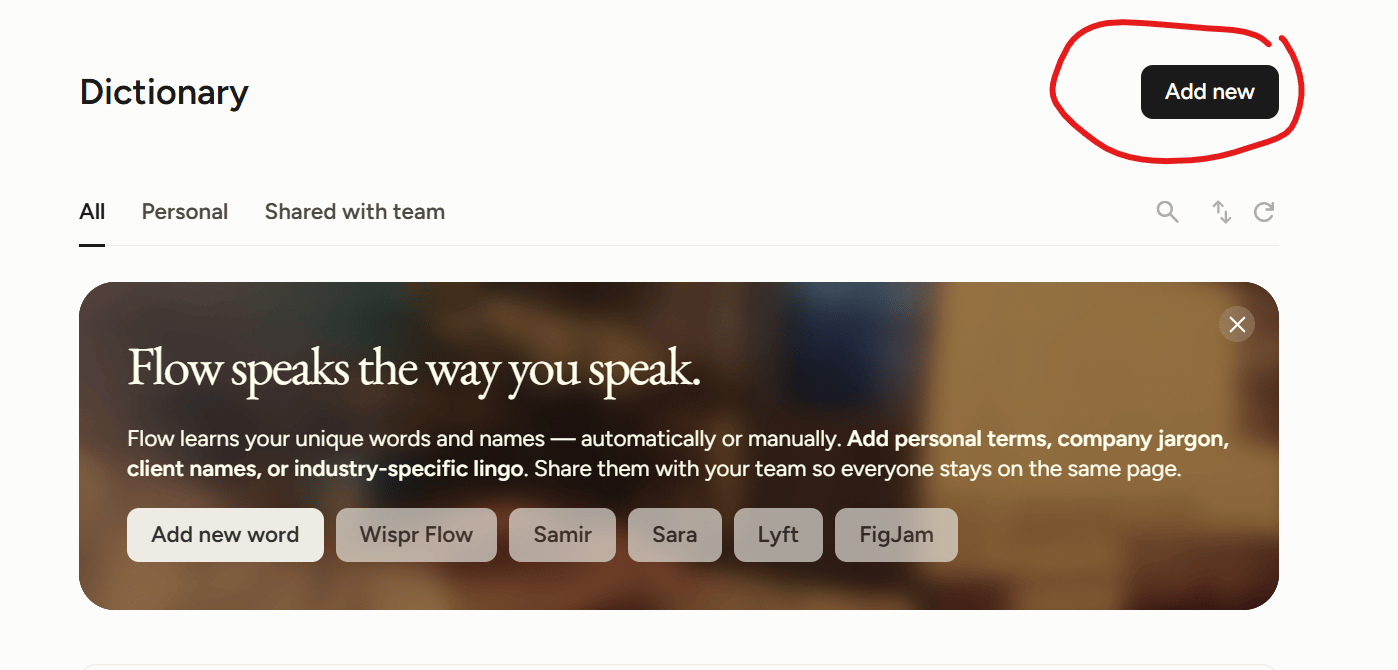
Wispr Flow learns your vocabulary over time, but you can accelerate this by front-loading the words that matter most to your brand. Open Flow's settings and manually add your product names, brand terms, ingredient names, proprietary features — anything a generic spell-check would flag or misspell.
This matters because when you dictate naturally, you'll use your actual brand language without stopping to correct transcription errors. If you sell a product called "BrightSkin Serum" and Flow keeps writing "bright skin serum," you'll waste time fixing it. Add it once, and every future dictation gets it right.
For teams: On Team and Business plans, use the shared dictionary feature to add your brand terms for the whole support team. Everyone's dictation will use consistent spelling from day one.
Step 2: Dictate Replies Instead of Typing Them
The next time a customer message comes in, resist the urge to type. Instead, activate Flow with your keyboard shortcut and talk through your response as if you were explaining it face-to-face. Don't rehearse or script it — just speak naturally.
Flow removes filler words like "um" and "uh," adds punctuation, and formats the text for the app you're in. If you're dictating into email, the tone skews slightly more formal. If you're in a live chat tool, it keeps things conversational. This automatic tone matching is what preserves your natural voice while keeping the output professional.
The result: a reply that carries your cadence, your word choices, and your warmth — without the bottleneck of typing it out character by character.
Step 3: Refine with Command Mode (Not Rewriting)
Sometimes a dictated reply is 90% right but needs a small adjustment. Instead of deleting and retyping, highlight the text and activate Command Mode. Then speak your edit instruction: "make this shorter," "soften the opening," or "add a line thanking them for their patience."
Flow rewrites the selected text based on your spoken instruction and replaces it inline. You can undo with Cmd+Z / Ctrl+Z if it overshoots. This keeps you in your natural voice while letting you polish without switching to "typing mode" and losing your tone.
Key principle: Use dictation for the first draft (captures your voice), then Command Mode for targeted refinement (preserves your voice while tightening the message). Never retype from scratch — that's where founder voice gets lost.
Part 2: Handle High-Volume Support Without Sounding Like a Robot
Step 4: Identify Your Top Ticket Types
Before building any shortcuts, pull up your last 50–100 support tickets and group them by theme. Most ecommerce brands find that 10–15 categories cover 80% or more of incoming volume. Common ones include: shipping status questions, return/refund requests, product usage or sizing questions, damaged item reports, order modification requests, and discount or promo code issues.
Write each category down with a short label. These become the foundation for your snippet library.
Step 5: Create Your Snippet Library
Wispr Flow's Snippets feature lets you save text blocks up to 4,000 characters and trigger them by speaking a short phrase. Open the Flow app, go to Snippets in the sidebar, and start building one snippet per ticket type.
Structure each snippet as a complete reply template — greeting, acknowledgment of the issue, resolution steps, and a sign-off. Write them in your founder voice (or better yet, dictate them using Flow so they naturally capture your tone).
Example setup:
Trigger phrase: "refund reply" → Expands to your full refund policy response with empathetic opening and next-steps instructions.
Trigger phrase: "shipping update" → Expands to your standard tracking information response with a reassurance line.
Trigger phrase: "damage report" → Expands to your replacement/refund offer for damaged items with photo request instructions.
Practical tips for trigger phrases: Keep them short and distinctive. Avoid phrases you'd say in normal conversation — "refund reply" is better than "about the refund" because you'll never accidentally trigger it mid-sentence. Flow strips punctuation when matching, so don't worry about periods or commas in your triggers.
For teams: On Team and Business plans, admins can create shared snippets that every team member can access. This means your VA or support rep says "refund reply" and gets the same founder-voice response you wrote. They all see it alongside their personal snippets.
Step 6: Personalize Each Snippet After It Drops In
Here's where the system comes together. A snippet gives you the structure and the voice. Command Mode gives you the personalization.
The workflow for each ticket: First, say your trigger phrase to drop in the relevant snippet. Then review the customer's specific situation — their name, their order details, the nuance of their complaint. Finally, highlight any section that needs customization and use Command Mode to adjust it: "replace the product name with Lavender Body Butter," "add a line about expedited shipping," or "make the tone more apologetic."
This takes 15–30 seconds per ticket instead of 3–5 minutes of typing from scratch. And because the base template was dictated in your voice and the edits are spoken (not typed), the final reply still sounds like a real person — not a macro.
Step 7: Use Hands-Free Mode for Ticket Queues
When you're working through a backlog of 20+ tickets, switching between keyboard and mouse for each one breaks your rhythm. Flow's hands-free mode lets you dictate continuously without holding any keys.
Activate it with your hands-free shortcut (Fn + Space on Mac, Ctrl + Win + Space on Windows), and Flow keeps listening until you stop it. Work through your queue by reading each ticket, speaking the appropriate snippet trigger, then dictating any customizations — all without touching the keyboard.
This is particularly effective on mobile. If you're reviewing tickets from your phone, Flow's keyboard integration lets you process simple replies while away from your desk.
Making It Stick: The Daily Workflow
Morning: Open your ticket queue. Activate hands-free mode. Work through new tickets using snippet triggers + Command Mode personalization.
Midday: Check for follow-ups. Dictate responses naturally for anything that doesn't fit a template — these are the messages where founder voice matters most.
Weekly: Review any new question patterns. If you see a new ticket type appearing frequently, dictate a new snippet for it. Update your personal dictionary with any new product names or terms.
The goal isn't to automate your customer service into silence. It's to remove the mechanical friction of typing so that your actual voice — the one that built the customer relationship in the first place — comes through in every reply, whether you're answering five tickets or fifty.
Do You Want To Learn About AEO Weekly?
I started writing a second newsletter. Once a week.
One topic: AI Search Optimization.
You can check it out here or click below.
The Quick Read:
Facebook turns Marketplace into an AI-powered selling machine with auto-replies, instant listings, profile summaries, and built-in shipping, reducing seller friction and boosting conversion at scale.
Claude unlocks 1M token context at standard pricing, removing long-context costs and enabling full codebases, contracts, and agent workflows to run without compression.
OpenAI quietly tests an Ads Manager, but with weak early CTRs and high entry costs, it must prove ChatGPT ads can truly compete with Google.
Shopify bets big on agentic shopping, where AI personal shoppers drive discovery and purchases, potentially reshaping how brands get found beyond search and ads.
Okara launches AI agents that turn Reddit and SEO into growth engines, auto-generating on-brand responses and surfacing high-intent opportunities in real time.
Midjourney V8 drops with 5x faster generation, sharper text rendering, and advanced personalization, pushing image AI closer to true creative control.
Google AI Studio upgrades vibe coding with an agent that builds full-stack apps from prompts, adding Firebase, APIs, and multiplayer features in one flow.
Claude introduces Dispatch, a persistent agent workflow that completes tasks asynchronously, bringing true “assign and return to finished work” productivity.
The Tools List:
🤖 Tila - Infinite AI canvas. Top neural networks in a single hub
📹 Video interviews by Outset - Conduct user surveys with video and AI.
🖊️ Instant Summaries by Shortwave - Smart TL;DRs for every email.
📧 My Ask AI - Let AI answer 75% of customer support emails.
📲 Zocket - AI social media ad platform
🖌️ Sesame - A Creative Tool Purpose-built for Brand Expression
About The Writer:

Jo Lambadjieva is an entrepreneur and AI expert in the e-commerce industry. She is the founder and CEO of Amazing Wave, an agency specializing in AI-driven solutions for e-commerce businesses. With over 13 years of experience in digital marketing, agency work, and e-commerce, Joanna has established herself as a thought leader in integrating AI technologies for business growth.
For Team and Agency AI training book an intro call here.