- AI for Ecommerce and Amazon Sellers
- Posts
- Guide: AI Video Feedback
Guide: AI Video Feedback
A Full SOP with Prompts Inside

Jo Lambadjieva
May 05, 2026
In partnership with


From Our Sponsor:
Why does every QBR sound like it took an hour to prep?

The strategic-account QBR has a different feeling. The CSM walks in knowing the buying committee, usage trends, support history, news on the company. They've blocked an hour to prep. The customer feels seen.
The other 190 QBRs don't get that hour. The CSM scans the dashboard five minutes before the call. They wing it. The customer answers the same baseline questions for the third time this year.
What if every QBR was a strategic-account QBR? Two minutes before the call, your CSM has the full brief in Slack: usage trends, support history, NPS, news on the company, what their champion just posted on LinkedIn.
Every customer feels like your top customer. Even when there are 200 of them.
3,000+ tools connected. SOC 2 certified. Your data never trains models.
"It was almost instantly adopted by the bulk of my team." Boris Wexler, CEO, Space Dinosaurs
Guide: AI Video Feedback — How to Quality-Check Your Editors’ Work in Minutes
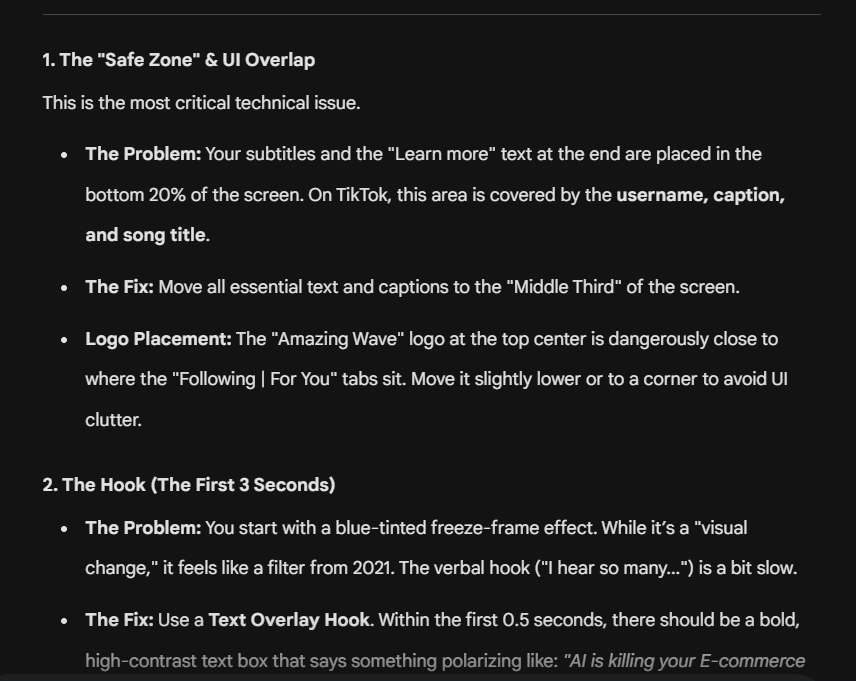
example of the output for one of my videos.
Understanding AI-Powered Video Feedback
Reviewing video edits is one of the most time-consuming parts of managing content production. Whether you’re hiring a new editor or refining output from an existing team, you need to verify that subtitle placement, pacing, lighting, and overall style all meet your standards for each platform. Doing this manually across YouTube, TikTok, and Instagram means watching every cut multiple times and compiling notes by hand.
Gemini changes this by allowing you to upload a video and receive structured, frame-by-frame feedback against criteria you define in advance. The key is that those criteria don’t come from guesswork — they come from analysing what already works for top performers in your space.
This guide walks through the complete workflow: identifying your target channel, studying competitor videos that are performing well, extracting the patterns that make them work, converting those patterns into evaluation criteria, and using Gemini to review your own videos against those standards. The result is a repeatable feedback system that gives you detailed, actionable notes on any video in minutes rather than hours.
What You’ll Need
Tools
• Gemini 2.5 (for video analysis and criteria generation)
• A method for downloading competitor videos (screen recording, yt-dlp, or platform-native download where available)
Assets
• 3–5 high-performing competitor videos from your target platform
• Your own video edit ready for review (MP4 format recommended)
Context
• The platform this video is intended for (YouTube, TikTok, Instagram Reels, etc.)
• Your target audience and content category
• The objective of the video (engagement, conversion, brand awareness, education)
Step 1: Define Your Channel and Objective
Start by clearly identifying the platform the video is intended for and the goal it needs to achieve. This matters because each platform has different conventions for pacing, aspect ratio, subtitle positioning, and audience behaviour. A YouTube long-form tutorial has fundamentally different editing requirements than a TikTok product showcase.
Document the following before proceeding:
• Platform (e.g., TikTok, YouTube Shorts, Instagram Reels, YouTube long-form)
• Content type (e.g., product demo, talking head, tutorial, lifestyle)
• Target audience (e.g., ecommerce sellers, fitness enthusiasts, Gen Z consumers)
• Primary objective (e.g., drive product page clicks, build brand trust, maximise watch time)
This context becomes the foundation for every subsequent step. Without it, the criteria you develop and the feedback Gemini provides won’t be calibrated to the right standard.
Step 2: Collect High-Performing Competitor Videos
Identify 3–5 videos from competitors or creators in your space that are clearly performing well. “Performing well” means high view counts relative to the account’s size, strong engagement (comments, shares), and the kind of content you want to produce yourself.
Selection criteria:
• Same platform you’re targeting
• Same content category or niche
• Published recently enough to reflect current platform trends
• Demonstrably high performance (views, engagement rate, shares)
Download these videos or save them in a format you can upload to Gemini. You’ll use them in the next step for pattern analysis.
Step 3: Analyse Competitor Videos for Patterns
Upload each competitor video to Gemini individually and use the following prompt to extract a structured breakdown of what makes the video work.
Competitor Analysis Prompt
You are a professional video editor and content strategist.


Analyse the attached video in detail. This video is performing well on [PLATFORM] in the [NICHE/CATEGORY] space.


Break down the following elements:


1. Structure & Pacing

   - Total length

   - Hook approach (first 3 seconds)

   - Average cut frequency (cuts per minute)

   - Segment structure (intro, body sections, CTA/outro)

   - Pacing shifts (where it speeds up or slows down and why)


2. Visual Style

   - Aspect ratio and framing

   - Camera angles and movement

   - Lighting style (natural, studio, mixed)

   - Colour grading and tone

   - Use of B-roll, product shots, or screen recordings


3. Text & Subtitles

   - Subtitle style (font, size, position, animation)

   - On-screen text overlays (callouts, labels, CTAs)

   - Lower thirds or name titles


4. Audio

   - Music style and volume relative to voice

   - Sound effects usage

   - Voice tone and delivery pace


5. Engagement Techniques

   - Pattern interrupts (visual or audio changes to maintain attention)

   - Call-to-action placement and style

   - Retention hooks (what keeps viewers watching)


Return as a structured breakdown with specific timestamps where relevant.
Repeat this for each competitor video. You’ll end up with 3–5 detailed analyses that reveal the common patterns driving performance on your target platform.
Step 4: Generate Evaluation Criteria from Patterns
Once you have your competitor analyses, use Gemini to synthesise them into a single set of evaluation criteria. These criteria become the standard your own videos will be measured against.
Criteria Generation Prompt
You are a video production quality assurance specialist.


I’m providing analyses of [NUMBER] high-performing [PLATFORM] videos in the [NICHE/CATEGORY] space. Based on the common patterns across these analyses, create a comprehensive evaluation rubric.


[PASTE YOUR COMPETITOR ANALYSES HERE]


Generate an evaluation rubric with the following structure:


For each category (Pacing, Visual Style, Subtitles & Text, Audio, Engagement Techniques), provide:


- Criterion name

- What “good” looks like (based on the patterns from these top performers)

- What “needs improvement” looks like

- Specific measurable benchmarks where possible (e.g., “cuts every 3–5 seconds during product demos”)


Also include a section for platform-specific requirements:

- Optimal video length range

- Aspect ratio and safe zones

- Subtitle positioning rules (accounting for platform UI elements)

- CTA timing and placement conventions


Return as a structured rubric I can use to evaluate any new video.
Review the rubric and adjust any criteria that don’t match your specific brand standards. For example, if the competitors all use high-energy music but your brand is calmer, modify that criterion accordingly.
Save this rubric — it becomes a reusable asset you can apply to every video review going forward.
Step 5: Review Your Video Against the Criteria
Upload the video you want reviewed to Gemini along with the evaluation rubric from Step 4. Use the following prompt to generate structured feedback.
Video Review Prompt
You are a senior video editor conducting a quality review.


Context:

- Platform: [PLATFORM]

- Target audience: [AUDIENCE]

- Video objective: [OBJECTIVE]

- Content type: [TYPE, e.g., product demo, talking head, tutorial]


Evaluation rubric:

[PASTE YOUR RUBRIC FROM STEP 4]


Review the attached video against every criterion in the rubric. For each criterion:


1. Score: Pass / Needs Improvement / Fail

2. Current state: What the video currently does

3. Specific feedback: What exactly should change, with timestamps

4. Priority: High / Medium / Low


After reviewing all criteria, provide:


- Top 5 priority fixes (ranked by impact on performance)

- Specific revision instructions an editor could act on immediately

- An overall readiness assessment: Ready to publish / Needs minor revisions / Needs significant rework
The output gives you a detailed edit list you can hand directly to your video editor, with specific timestamps and actionable instructions rather than vague feedback.
Step 6: Iterate and Build Your Standards Library
After your editor implements the feedback and delivers a revised cut, upload the new version to Gemini and run the same review prompt. This creates a feedback loop where each revision is evaluated against the same consistent standard.
Over time, refine your rubric based on what you learn:
• If certain criteria consistently don’t apply to your content type, remove them
• If you notice quality issues the rubric doesn’t catch, add new criteria
• If you expand to new platforms, create platform-specific rubric variants by re-running Step 3 and Step 4 with competitor videos from that platform
The goal is a living evaluation system that improves with each review cycle and keeps your content quality consistent regardless of which editor is producing the work.
Do You Love The AI For Ecommerce Sellers Newsletter?
You can help us!
Spread the word to your colleagues or friends who you think would benefit from our weekly insights 🙂 Simply forward this issue.
In addition, we are open to sponsorships. We have more than 66,000 subscribers with 75% of our readers based in the US. To get our rate card and more info, email us at [email protected]
The Quick Read:
Botify log file data shows OpenAI's automated crawl tripled after GPT-5 launched, while ChatGPT-User traffic fell 28%, pointing to a maturing index rather than a shrinking user base.
Stanford research puts early-career workers as AI's first casualties, with a 16% employment drop since 2022, and graduates risk being frozen out before they can ever be replaced.
Google's Workspace Intelligence connects Gmail, Docs, Sheets and Slides into a single context layer, letting Gemini draft, respond, schedule and build decks without users ever leaving Chat.
China's NDRC has blocked Meta's $2bn acquisition of AI agent startup Manus, signalling Beijing now treats AI assets like semiconductors and that relocating overseas offers no protection.
Amazon, Meta, Microsoft, Salesforce and Stripe have joined the UCP Tech Council, pushing agentic commerce toward an open standard, with Amazon's shift from blocking AI bots to shaping the protocol the most significant move of all.
The UCP now has catalogue, cart, checkout, order and identity layers in place, with REST, MCP and Agent2Agent transports giving merchants and AI agents a common language to trade across any platform.
Claude's new connectors give direct access to Blender, Adobe, Ableton, Autodesk and Splice, letting creatives automate production work and build custom tools without leaving their existing workflows.
Amazon's AMC SQL generator lets advertisers build complex audience segments in plain language, cutting query development from hours to minutes without writing a single line of code.
The Tools List:
🧑 Taskade Custom AI Agents - Specialized tools designed to automate routine activities like research, task management, and content creation
⚙️ Fora - Artificial intelligence designed for the C-suite.
✈️ Trip Planner GPT - Plan your trips effortlessly with a custom itinerary and expert advice
⁉️ FrequentlyAskedAI - Instant AI-powered FAQ builder
✍️ Syncly - Surface real customer pains with AI feedback analysis.
About The Writer:

Jo Lambadjieva is an entrepreneur and AI expert in the e-commerce industry. She is the founder and CEO of Amazing Wave, an agency specializing in AI-driven solutions for e-commerce businesses. With over 13 years of experience in digital marketing, agency work, and e-commerce, Joanna has established herself as a thought leader in integrating AI technologies for business growth.
For Team and Agency AI training book an intro call here.